Sunday, November 21, 2010

Mechanical Object - Polaroid Camera

For my Designing Computer Graphics final we had to pick a mechanical object from a designated group of images. I chose the Polaroid Camera, because it looked like fun. 


The only requirements for the project was to use Illustrator, and not to use live trace/paint. After a few days of fighting with my meshes, I finished my project on time. Very excited about the outcome, I could have added more details, but maybe when I'm more familiar with the tools and program, I'll have more patience.

Now that I handed in my project, I have to wait to see the outcome of my hard work.


Friday, November 5, 2010

Tea Concept Label

For our second project in Digital Computer Graphics, we had to make a drink label using the following guidelines:

-No gradients, transparencies, filters, effects, blurs, blends or Live Trace
-3 colors
-Draw with the pen tool
-Use only one font

We were given a list of drinks, I choose the organic tea, which will be sold to upper-middle class adults 20-40, new age hippie yuppies. The fictional company is based in Vermont.

Here is my initial concept for this project:


I noticed I forgot to give the tea a flavor, so I added that to the label and changed the size and placement of some elements:

For the final product, I just added a few minor details, nothing drastic. But I did notice that for some reason the "i"s look like they are capitalized. I used the "Save for Web and Devices" feature in Illustrator all three times. I'm not sure why the image became distorted:
I decided to save the file as .pdf to see if I would get the same results and it came out fine. I'm going to explore this issue further to find out why that will occur. 

This is my final image, I promise I'm not going to play with it anymore:


Saturday, October 30, 2010

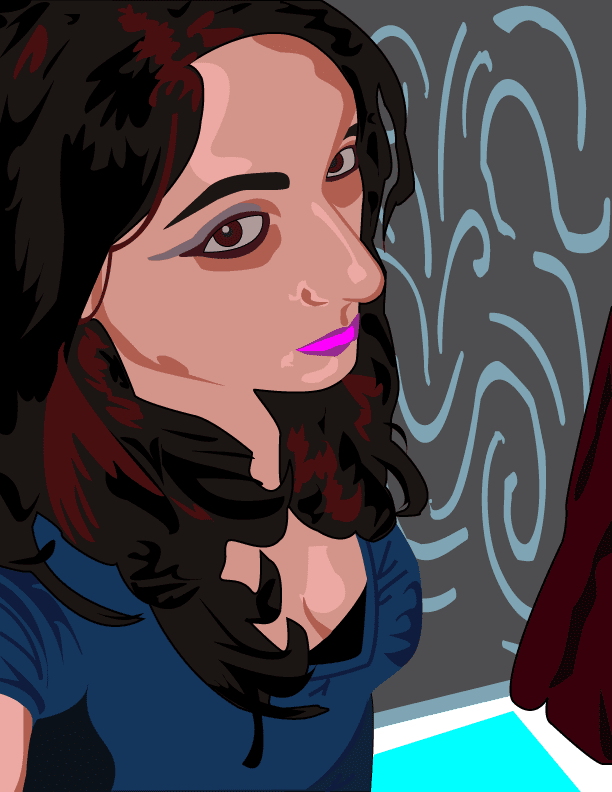
Self-Portrait

Having a lot of fun working with vector images this month. Here is my self-portrait, didn't want to get too carried away :)


Monday, October 11, 2010

Kicking it with Roy Lichenstein

For a school project, we had to make a digital pop art piece. After having some fun with Warhol style screen prints, but going to play with the colors a bit more. 


I decided to give Roy Lichenstein's comic book style a try. As you can see I'm a huge fan of True Blood. Can't wait for the new season to start! 

With brighter colors


Sunday, October 10, 2010

Kuler: Interactive Color Themes

I love finding new sites and tools that really help me expand my creativity. One new tool I came across in the Adobe line is Kuler.

This site is a little gem because you can create color swatches from photos. 
You can easily upload a photo or use the Flickr library (which is great if your just siting around and looking for inspiration). The site is very user friendly and creates different swatches based on the mood you click on.

If you like to be in total control, you can make a custom swatch by moving the circles to different colors in the picture.

In order to save your color swatch you have to be signed in with an Adobe ID (which is free, and gives you access to other Adobe sites and Adobe TV).

I recommend saving it as a "public" swatch so you can easily upload it into Illustrator. I hate manually saving brushes and other add ons, so I really like this next feature.

In Illustrator, you can find the Kuler window under "Extensions". 
Since we saved our file as a public swatch, we can easily find it in the search menu. This window also provides a live connection to the Kuler site, so you will have new choices when they become available. 
You can add the swatch to your swatches window by pressing the add to swatches button at the bottom of the window.

Did you loose your Welcome Screen?

Awhile back I thought the Welcome Screen was very annoying for Adobe Illustrator. I didn't realize what a useful tool it really was. 


You can start different projects, open up recent items, watch tutorial videos or load a template. It is also very easy to create a file for mobile and other devices. 


The content type menu lets you create almost anything, making illustrator a very versatile program.


Getting Back the "Welcome Screen"

I never read the Help menu, so I kept typing in "Welcome" or "Welcome Screen" and nothing would be appear. After a few moments I just started to stare at my screen and of course the answer was staring back at me.


Needles to say I am never checking "Don't show again" ever again! The Welcome Screen is a timesaver.

Wednesday, October 6, 2010

Coding Errors

I was browsing the web to check out design trends and came across this one web design firm, that apparently didn't check the site on all platforms. This is pretty embarrassing, since their main business is to create websites. 

Here is an example of something you don't want to happen to you: